ComGen Data Stream Generator 
|
ComGen Data Stream Generator |
Top Previous Next |
|
ComGen5 is an application delivered free with ComCap5, designed for testing ComCap. It generate various types of test streams using any or all of the PC serial COM ports and hundres of network streams, UDP Client, TCP Client or TCP Server, using SSL/TLS if needed, with both IPv4 and IPv6 protocols.
ComGen is a low overhead application, and will run for hundreds of hours, generating millions of lines of test data, to thoroughly test ComCap. It may be installed on the same PC as ComCap, or copied onto remote PCs and run there.
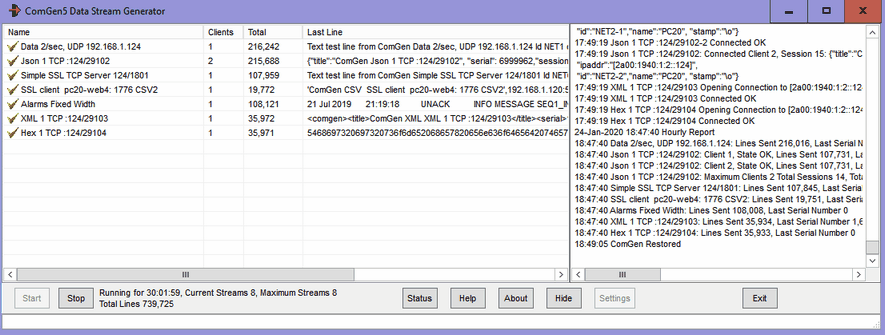
The main ComGen window shows data generation channels in the left pane, and log on the right. There are buttons to Start and Stop data generation, to hide the window and to access the Settings window.
When all the settings are completed, click Start to commence data streaming. The data generation window shows one row for each stream of data being generated, a tick box indicates if that channel is currently streaming data, the total number of remote clients connected to that channel, the total number of lines generated, and the actual text of the last line (which may help getting the Data Type escapes correct).
ComGen Settings ComGen Settings has five tabs: Data Types, Network Channels, Serial Port Channels, General and Network Options. Once these settings have been specified, OK or Apply should be clicked to save the settings. The Settings window is only available when not generating data.
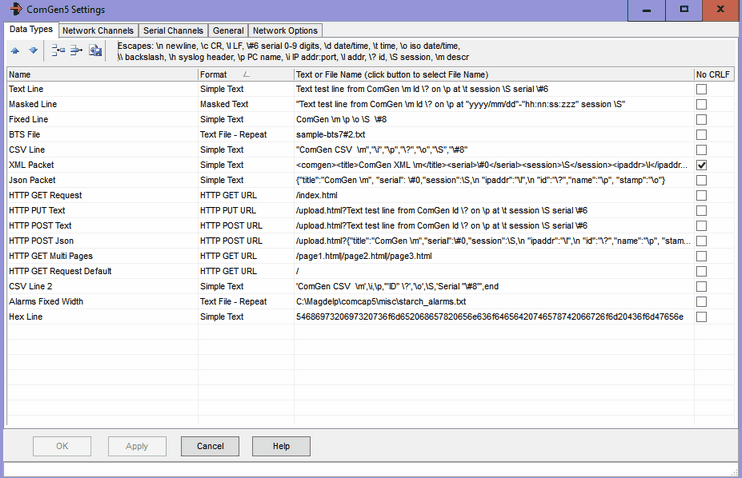
Data Type Settings Data Types defines the actual lines of data that will be streamed, which may be the common between two or more channels 15 data types are supplied with ComGen, and others may be created as needed to test ComCap.
Each different type should be given a name, and a format selected:
Both text formats may include one or more escape sequences:
When using Text or Binary File formats, the button at the end of the row may be clicked to select a file to stream. The file may be actual data captured by ComCap such as CDRs (two small sample files are supplied) or any other data, optionally including the escape sequences above.
A sample Simple Text format might be:
Text test line from ComGen Id \? on \p at \t serial \#8 No CRLF ticked means no line ending is sent for Simple Text or Masked Text, which is usually how UDP data is sent.
HTTP Requests There are three new Data Type Formats, HTTP GET URL, HTTP POST URL, HTTTP PUR URL which should be used with TCP Client or Multi TCP Client. The Remote Host and Port are set in the Network grid, with the page and parameters specified as the Data Type Text, ie: HTTP GET URL and '/index.html' will get that URL, multiple URLs can be accessed by separating them with |, ie: '/page1.html|/page2.html|/page3.html'. For both POST and PUT, parameters follow the URL and ?, ie:
/upload.html?Text test line from ComGen Id \? on \p at \t session \S serial \#6
with the escape dynamically processed identically to Simple Text format. ComGen5 does not support pipelining but waits for a response to each request, which is reported in the result column of the main progress grid. In Setting, General, the 'HTTP User Agent' for the requests may be specified. The request and first response will always be logged, but generally subsequent requests are not logged, just counted.
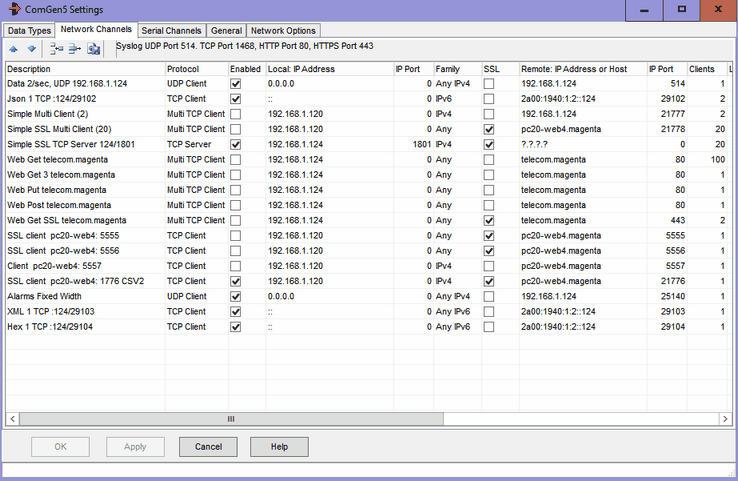
Network Channel Settings This tab specifies TCP and UDP network data generation channels.
Network configuration is very similar to Common Settings, Network Channels, Local and Remote IP and Port at the same. To simplify this grid, retry attempts have been made common to all channels and are specified on the Network Options tab, see below. Note that SSL is set-up in the grid, unlike in ComCap4. A remote host name can only be specified if Family Protocols are slightly different.
Description The channel description is optionally included in the Data Types line using the escape \m as part of the line sent remotely.
Clients For Multi TCP Client, how client connections should be created, up to 2,000, The Network Options tab specifies how many new clients are created each second, defaulting to 100. Note there is overhead in Windows setting up new connections, particularly with SSL, so you need to restrict how many are generated to avoid them being rejected.
Lines/Session Specifying a non-zero number for TCP Client and Multi TCP Client causes the TCP session to be disconnected after that many lines of data have been sent, to simulate remote data capture devices that continually connect, send some data and then disconnect.
Data Type Clicking Data Type will drop down a list of all the Data Types specified on the previous tab, from which one should be selected.
How Often, Often By How Often is used to specify the frequency with which data is generated for this channel, selected from the drop down menu as Each Second, Each Minute, Each Hour and Random (between one and 10 seconds) with the Often By multiplier. So 5 by Each Second is five lines of text each second, 30 by Each Minute is one line every two seconds. ComGen has been tested with up to 50 lines per second, and is limited to 60 lines per second. Note that all lines are sent at the start of the second, rather than being spread out evenly.
Next Serial This column specifies the Next Serial Number that will be used for the data, if it includes the \# mask.
Device Id (first line) Specifying non-blank text causes this text to send at the start of the session before any other data is sent, to simulate remote data capture devices that identify themselves in some way (like the Ecov). If this data should be sent as a separate line, use a /n escape to send CRLF, ie <TEST>\n
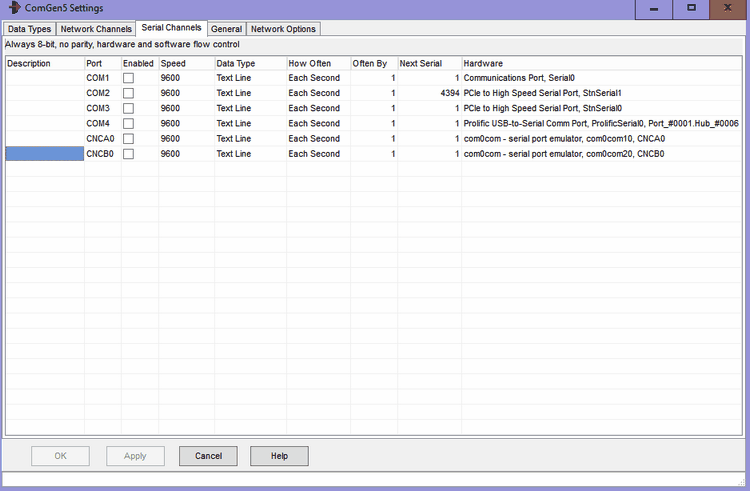
Serial Port Channel Settings This tab specifies serial port or RS232 port settings. .
Serial RS232 port configuration is very similar to that in Common Settings, Serial Ports. Note that ComGen only support 8 bit’s for data with 1 stop bit and no parity. Some virtual ports may have strange names like CNCA2, but these will work identically to those starting with COM.
Description The channel description is optionally included in the Data Types line using the escape \m as part of the line sent remotely.
Data Type Clicking Data Type will drop down a list of all the Data Types specified on the previous tab, from which one should be selected.
How Often, Often By How Often is used to specify the frequency with which data is generated for this channel, selected from the drop down menu as Each Second, Each Minute, Each Hour and Random (between one and 10 seconds) with the Often By multiplier. So 5 by Each Second is five lines of text each second, 30 by Each Minute is one line every two seconds. ComGen has been tested with up to 50 lines per second, and is limited to 60 lines per second. Note that all lines are sent at the start of the second, rather than being spread out evenly.
Next Serial This column specifies the Next Serial Number that will be used for the data, if it includes the \# mask.
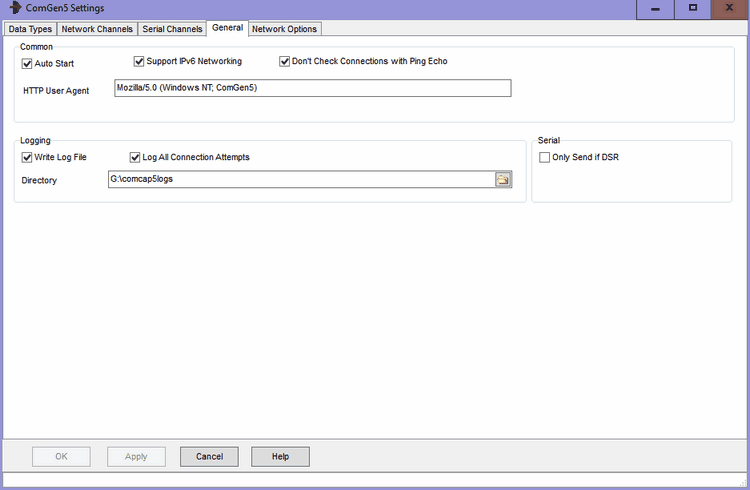
General Settings This tab specifies general settings for ComGen.
Auto Start The 'Auto Start' tick box specifies that streaming starts as soon as ComGen is run. If ComGen is to run when Windows starts, a shortcut should be placed in the Windows Startup folder.
Support IPv6 Networking Ticking this box enables IPv6 support for ComCap, allowing IPv6 addresses to be specified in various settings screens.
Don’t Check Connections with Ping Echo As detailed on Network configuration, TCP Client normally sends a ping to a remote server, which is echoed back if the server exists. Some firewalls and routers may be configured to block pings, causing ComCap to fail to receive the echo and be unable to connect. This tick box bypasses the ping, allowing an immediate connection attempt to the remote server. The penalty is Windows takes about 40 seconds to time out a failed connection attempt, compare to 10 seconds for ping.
HTTP User Agent When sending HTTP requests, the User Agent sent with the requests, defaults to 'Mozilla/5.0 (Windows NT; ComGen5)'.
Serial Only Send if DSR This tick box specifies that serial data should only be sent if the remote computer has raised Data Terminal Ready.
Write Log File A tick box that specifies ComGen should keep a disk log file of all activity, as well as displaying it on the screen,
Logging Directory Specifies the drive and directory in which daily log files should be created.
Log All Connection Attempts If ticked, increases the amount of logging by including repeated connections and disconnections, normally only the first and last are logged.
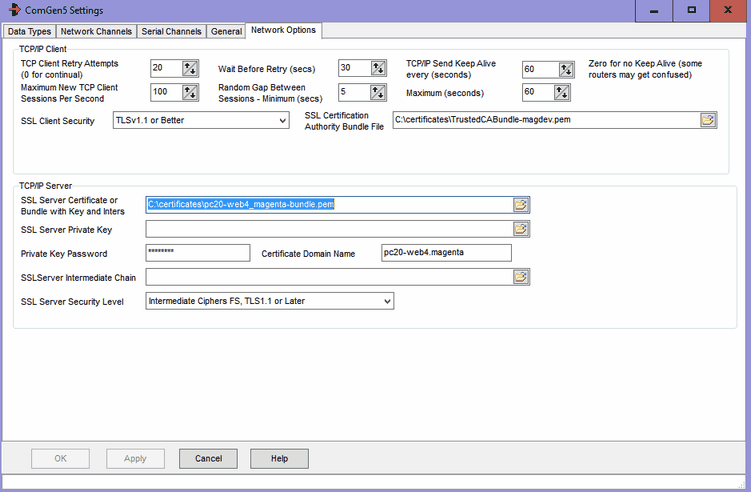
Network Options These network settings are common to all network channels,
The same SSL certificate will be used for all TCP/IP Server streams. There is no remote server certificate checking for TCP/IP client.
TCP/IP Client, Retry Attempts For TCP Client only, specifies the number of connection attempts that should be made to the remote computer before failing. Zero attempts means never stop, but keep retrying for ever, other the maximum attempts is 99.
Wait Before Retry Seconds For TCP Client only, specifies the gap between a failed connection and the next retry attempt, with a minimum of 10 seconds and maximum of 300 seconds (five minutes). Note a connection attempt takes a minimum of 10 seconds, but about 40 seconds if ping is disabled. The more frequent the connection attempts, the more potential network traffic that is carried, but the lesser probability of lost data.
TCP/IP Send Keep Alive For TCP Client only, this option enables automatic keep alive messages to be transmitted every few seconds, defaulting to 20 seconds. Keep alive is only needed when there are long gaps during data capture, and a router or firewall may disconnect the TCP/IP connection due to inactivity (perhaps after 5 or 10 minutes). This option should not be needed on LANs. Setting seconds to zero disables Keep Alive, which may upset some routers.
Maximum New TCP Client Sessions Per Second For Multi TCP Client only, to avoid starting all multiple sessions at once (which most servers will be unable to handle), specifies the number of new sessions per second, typically 100, or less for slower servers.
Random Gap Between Sessions For Multi TCP Client only, two fields to specify the gap between new sessions as a range of seconds as Minimum and Maximum, defaulting to 5 and 60 seconds. This causes repeat sessions to be staggered. Any sessions that fail to connect first time will retry after 'Wait Before Retry (secs)' for 'TCP Client Retry Attempts'.
SSL Client Security Specifies the SSL security level to ensure that minimum SSL/TLS security standards are enforced. The options are:
The default security level is 'TLSv1.2 or Better' which is the PCI DSS council standard and recommended by major browsers. Generally the only reason to support old protocols or low security standards is to access 10 year or older servers that only supported those old protocols. Likewise, all SSL certificates have used 2,048 bit minimum private keys for several years and any older ones should have long expired (except some root certificates). The SHA1 hash was used to sign old certificates now replaced by SHA2 (aka SHA-256). Some SSL ciphers are potentially open to attack, but may still be needed to access very old servers that don't support anything better. Private keys with RSA 3,072 bits are the minimum recommended by NIST for use after year 2030, larger RSA keys increase the size of SSL certificates and thus the handshaking for each SSL connection.
Note if the security level is set too high, an SSL/TLS connection may just fail without any sensible explanation
SSL Certificate Authority Bundle File Specifies the actual file name of the PEM Bundle File, the file supplied with ComCap with about 289 CA root certificates is:
C:\ProgramData\Magenta-Systems\ComCap4\Certificates\RootCaCertsBundle.pem
Extra PEM root certificates can be added to this file if needed, manually, or it can be replaced with a file containing only certificates that should be trusted, perhaps self signed certificates. Note the CA file is also used to validate SSL/TLS server certificates.
SSL/TLS TCP/IP Server These settings specify the SSL/TLS certificate for all TCP Server channels, without which they will not start, see SSL/TLS and Certificates. The certificate may be shared with ComCap5 channels or other applications.
SSL Server Certificate or Bundle with Key and Inters Specifies the SSL/TLS server X509 certificate file, which may contain one or more certificates in various formats and a private key. Sometimes separate files are used for server certificate, private key and optional intermediate certificates, but using a bundle keeps them together for simplicity. The two bundle formats supported are PEM (which contains base64 ASCII) and PFX or P12 which is PKC12 binary format. Certificate only files may be PEM, DER, or P7 format. Sometimes PEM files have a CER extension.
Note ComGen checks hourly for any new certificate files being available and will automatically load them without needing to restart the channel, provided the file names are unchanged.
SSL Server Private Key and Password If the SSL Server Certificate was not a bundle including a private key, allows a SSL Server Private Key X509 PEM file to be specified, see SSL/TLS and Certificates which must match the Servr Certificate. If the private key is encrypted, the password should be specified here, this also applies to bundles.
Certificate Domain Name Defaults to the PC host name which may include a domain, but needs to be the Domain Name assigned to the IP address of the TCP Server, for which the SSL/TLS server certificate has been issued. For internal systems with internally issued certificates, the Domain Name may simply be the computer host name.
SSL Certificate Intermediates If the SSL Server Certificate was not a bundle including intermediates, allows a default SSL Certificate Intermediate X509 PEM file to be specified, see SSL/TLS and Certificates. Most server certificates are signed by the supplier using an intermediate certificate, which is in turn signed by a trusted root CA certificate, so this intermediate needs to be supplied to allow the chain to be verified against a trusted root.
SSL Server Security Level Specifies the SSL security level to ensure that minimum SSL/TLS security standards are enforced. The options are:
While using the highest level of security is always best, this may prevent older clients connecting to ComCap. If clients attempt to connect with the latest TLSv1.3 protocol but fail, try setting security to 'TLSv1.2 or Earlier', the latest is not always the best. Note that the server SSL certificate must have a key length of the minimum the security level requires, or capture will not start. At the time of writing, the recommended default is 'High 112 bit Ciphers, TLS1.2 or Later', but this may change to 128 bit in a few years.
|